M.I.N.D
I designed a web interface for Pfizer in the start of my sophomore spring semester under the mentorship and guidance of Professor Missy Cummings. As my first project and experience within the design realm, I produced all wireframes in Illustrator, having only known that software at the time I began this project a couple months ago.
Motivation
The pharmaceutical company Pfizer needed a web app to increase staff efficiency during fermentation processes, allowing staffers to customize user-initiated notifications and lower the need for manual monitoring.
Site Structure
I conducted site visits to the Sanford, NC manufacturing plant to meet with staffers to discuss their needs and how the processes are performed. From these user interviews, I mapped out four main sections of the web app:
-
Situation Awareness
-
User-Initiated Notifications
-
Archive
-
General Settings
Design
I designed wireframes in a functional and industrial style to complement other software and tools that Pfizer users already use.
Situation Awareness
This page displays camera options, a main camera view, and space to extract variable trendlines from the fermentation tank machines.

User-Initiated Notifications
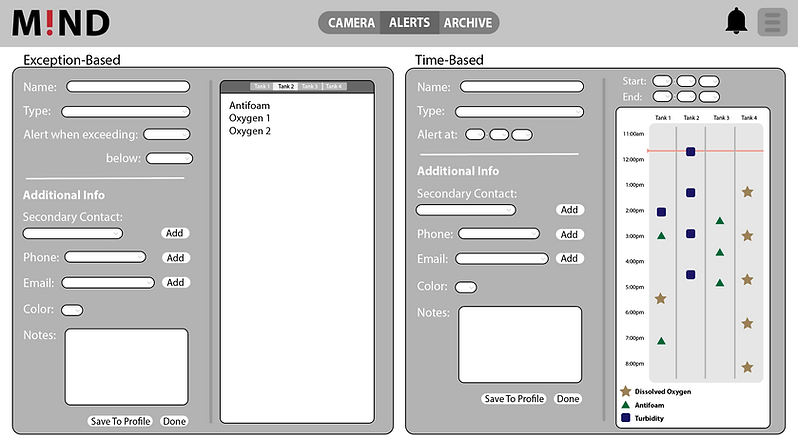
Users may set either exception-based notifications, which alert the user when the variable is not within specified parameters, or time-based notifications, which alert the user at specific times.
Archive
The archive displays a user-selected timeframe of past notifications, categorized by icons and colors.

General Settings
The user may customize their web app experience in the general settings, including profile contact information, adding secondary contacts, selecting snooze times, and more. It also includes a library of previously saved notifications.
